Coming from paper, slides, a spreadsheet or another tool?
You do not have to move everything first. Start with one event, bring your guest list as a CSV file, and rebuild a room only when you need it.
I use paper or PowerPoint
You draw rooms by hand or by moving shapes around on a slide.
Your first session
- Press Try it now. No account is needed.
- Pick the event, then type the guest count and the room width and depth in feet.
- Margo draws the room with tables, a stage and walkways. Drag things until it matches what you had on paper.
- Add an email (free) when you want to keep the plan, then press Share with client. Your client opens the link on a phone and picks a 2D plan or a 3D view.
- Press Print or export, then choose Plan or Setup pack, to print for your crew.
What comes with you
A photo or scan of your old drawing can sit behind the plan, so you can trace over it. In the editor, open the Room menu and choose Trace over a drawing.
What it costs
Free is $0 for one active plan. Pro is $59 a month and Business is $199 a month.
I seat guests in a spreadsheet
Your guest list and table numbers live in rows and columns.
Your first session
- Start a plan with no account and set the guest count and room size.
- Open Guests and choose Import. Pick your CSV file, or paste the rows you copied from the sheet. Columns like first name, last name, party, RSVP, meal, table, dietary and email are matched for you.
- Press Auto-seat. You see the seating before you apply it, and you can undo it. Tell Margo who must sit together and who must stay apart.
- Move a guest from table to table where you disagree.
- Print the seating chart, sorted A to Z, and the place cards.
What comes with you
Your whole guest list comes across as a CSV file, and you can export it again any time with Export CSV.
What it costs
Free is $0 for one active plan. Pro is $59 a month and Business is $199 a month.
I use another floor-plan tool
Your rooms and guest lists are already built somewhere else.
Your first session
- Start a plan with no account and type the room size, or open the editor and trace over a picture of the room.
- Rebuild each room once. On Pro and Business you can save it as a reusable room, so every new plan starts from it.
- Export your guest list from the other tool as a CSV or spreadsheet, then use Guests and Import in Margo.
- Share a link with your client, who can view it on a phone in 2D or 3D, comment, and approve or ask for changes.
- Print the setup pack for your crew.
What comes with you
Guest lists come across as CSV. Margo does not open another tool's plan files, so each room is rebuilt once and saved, or we build it for you: $199 one time for up to 3 rooms.
What it costs
Free is $0 for one active plan. Pro is $59 a month and Business is $199 a month.
What your client sees
Your client opens your link on a phone and chooses how to look at the room. They can switch at any time.
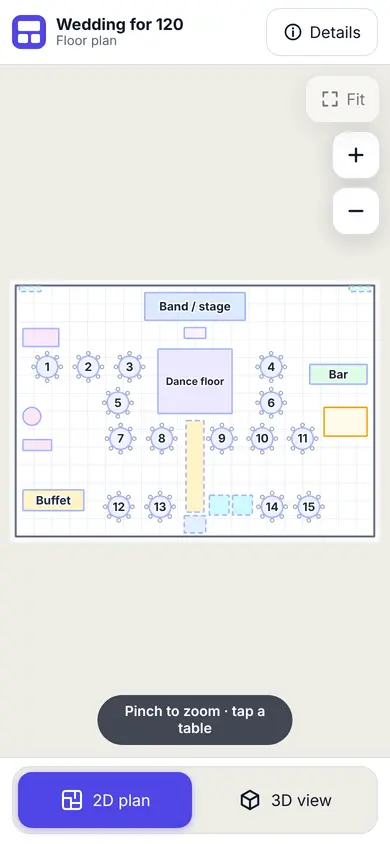
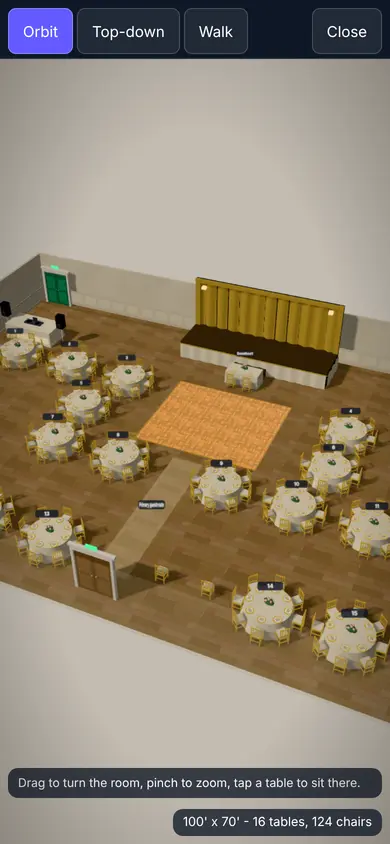
Plans and offers
- Free, $0: Plan one real event end to end.
- Pro, $59 a month: For planners and couples running more than one plan.
- Business, $199 a month: For venues and teams sharing one account.
New venues can apply for 60 days of Business free and one room built for you, with no card needed. Our team approves each application. Plans on the launch program are never deleted when it ends.
Venue launch program · Done-for-you room setup · Compare plans
What to expect
- Margo does not open another tool's plan files. Guest lists move by CSV, and rooms are rebuilt once.
- Free allows one active plan. If you plan several events at once, Pro is the plan to look at.
- The tour, the demo and an email to a person are the help you get. We have not published training videos.
Stuck? Ask a person
Email hello@eventfloorplans.com. We reply by email within 1 business day. The help pages are at /help.